Recently, we’ve discovered a very, very simple way of making your own cardboard, hard-wearing StoryCubes, using only:
A free bookleteer account
If you haven’t signed up for a free bookleteer account yet, do so here.
A4 single label paper, suitable for Inkjet or Laserjet printers
Full sheet label paper, available from any decent stationers (Avery code: DSP01).
Blank StoryCubes
Read about StoryCubes, and order blank packs here.
Firstly, design your StoryCube.
Sign into bookleteer. If you’re a new user, read the help page.
Design your cube using the bookleteer templates, export the file as a PDF, then upload to the Create A StoryCube page, or upload each image individually.
Select Generate StoryCube and download the file, from the top right corner of the screen.
Next, print and make.
Print using the label paper, and cut around around only the faces of the cube, not the tabs – it should look a crucifix (You can also protect your cube by using adhesive cellophane, by affixing a layer on top of the label sheet, then cutting out).
Peel off the backing paper, and stick onto a blank cube.
Fold your StoryCube, and voila!
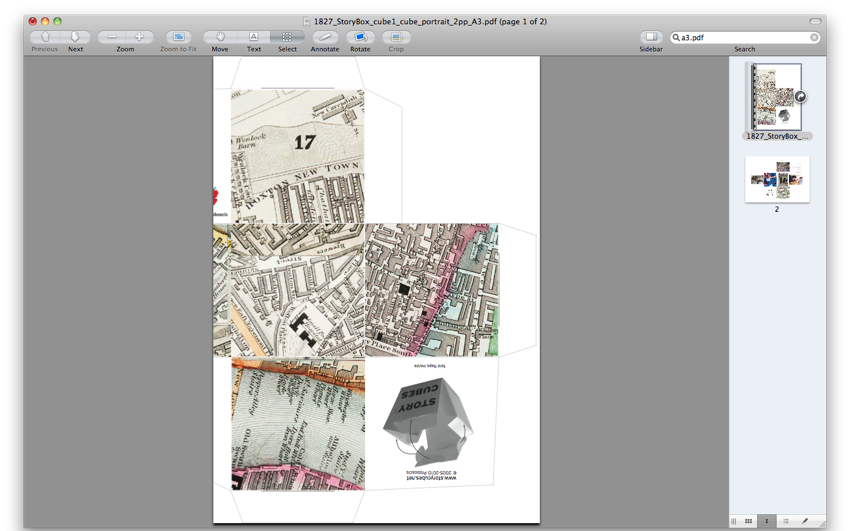
You can even use this method to make your own A3 size StoryCubes, without even owning an A3 printer.
Simply crop the A3 cube PDF into two documents, so that it can be printed across two sheets of A4 paper.
Then, cut out the two segments as shown, to form a two-part crucifix shape.
Stick onto to a blank A3 cube and fold…
… and you now have an A3 cube, using a standard home printer.
If any bookleteers discover more clever ways to make StoryCubes, do share!
This Saturday, the 10th of September, we’ll be running a book-making workshop at the New Cross People’s Library, now reopened after its closure by the council in May, and currently staffed by local volunteers, aided by Bold Vision.
We’re asking participants to bring lists and photos of their favourite books, to create a set of eBooks with bookleteer that reflect the kinds of books, things and services people would like to see in their community library.
Join us from 11.00 am – 1.30 pm at…
New Cross Library 283-285 New Cross Road London SE14 6AS
Hope to see you there.
Open till the 21st September, on a temporary license from Lewisham Council, the Library hopes to be granted a new tenancy, and is therefore holding a fund-raising tea party on the 17th of September. Donate £10 or more to attend, and be thanked in tea and cakes!
Hello, hello. Apologies for the lack of posts in the last two weeks – we’ve been away for the summer break, and have only just got back. To all faithful bookleteers who are still following… we salute you!
Before the event, we were asked to devise walking routes to create individual cubes, each side featuring a QR code, linking to a particular geographic spot on an online mapping service (Google Maps, OpenStreetMap, etc) – a start point, four waypoints, and a destination. Using an API Gordon coded, and the bookleteer API, entering the six location URL’s automatically generated a StoryCube. My route, based around memorials and tributes in different forms is available here.
Meeting just after 2.00pm, Simon and Gordon gave a summary of the project, and a recap of the development process so far. We talked about the current limitations of Google Maps when creating the cubes, particularly the inability to share manually added, user designated routes with other people (they require two waypoints to locate the route), and had some interesting ideas regarding the next stage of the project. What about a mix of map links, audio files and videos – an interactive tour, scanning QR codes near points of interest to access audio descriptions and related videos? Or, a quasi treasure hunt, requiring players to obtain QR code stickers for the cubes (discouraging them from scanning all the codes at once – cheating!) from certain spots to get the next destination?
We decided to use Simon’s cube for our first trial, his route focusing on locations acted on by “centrifugal and centripetal” forces – each point “acting as an attractor of sorts, which in some instances cannot be reached, yet which pulls the walker towards it”.
After departing from the studio, Giles scanned the first code to get our start point – the ramp under West Smithfield. Once there, we scanned the next spot, the middle of Charterhouse Square. All was going smoothly. However, after reaching the third spot, the omnimous brick circle in Golden Lane estate (the “Unplace” we featured in the City As Material: Streetscapes event), we were unable to load the next, despite trying with numerous phones – bad signal, or bad omen? Despite this, we were afforded time to ponder its unusual acoustic properties once again, and plot a cunning plan to subvert this synchronised failing of technologies… cheat!
Simon told us his next waypoint, the Curve Gallery in the Barbican Centre, which we arrived at via its winding walkways (after ceremonially scanning the code we missed). Another hurdle faced us here, as to gain entry to the exhibition, we were expected to don quarantine-esque shoe covers, and couldn’t enter as a group. Bah. The penultimate spot, another circle, on Monkwell Street, beckoned.
From there we were awarded our destination, the Museum of London, or more specifically, outside its entrance. Here, we asked if we were able to get into the recently renovated green space below, and were told “perhaps, but you might not be able to get back up!”. Rather than risk it, we retired to the pub right next door, content in a mostly successful first run of a StoryCube Cairn route.
We’re brimming with ideas for what might be possible next. Until then, view all our routes, and download the cubes yourself here.
A document of the five City As Material events we ran in London last year, this eBook collects the blog posts penned after each event, a selection of photographs taken, as well as an introduction to the project and our motives for undertaking it. Created in place of an individual eBook for Sonic Geographies, due to the absence of a special guest, this account of the series provides a narrative that was lacking from the other books produced, detailing the experience from each event on the day, not just the resulting output, and hopefully intriguing potential future collaborators.
Simply using the existing text from the bookleteer blog and full-page photographs as covers for each section, in a book, turns transitory blog posts and assorted snapshots into a publication that can stand on its own right, demonstrating the transformational effect and credence associated with a printed document (although it’s also readable online), made possible with the eBook format.
Read City As Material: An Overview with the online bookreader below, or download, print and make via Diffusion.
We’ll be running a drop-in Bookleteer workshop at the upcoming Platform Festival, which celebrates the launch of Islington’s new arts venue for young people, held during the 15th to the 31st of July.
If you’re aged 13 – 19, bring your ideas and digital content – photographs, stories, text, art – on a USB key drive, or create a Dropbox account and share the relevant files, and we’ll sign you up to Bookleteer, help you create your eBook or Storycube, then print and make it, for you to take home on the day and share online.
We’ll be there on Monday 25th July, from 2 – 4 pm, at:
Platform Hornsey Road Baths 260 Hornsey Road London N7 7QT
It is now a year since we launched the short run printing service so now seemed like a good time to reflect on what people in different areas have been using the printing service for. In this post we reflect on its use in two projects connected to the British Museum.
Julie Anderson, the Assistant Keeper of Egyptian and Sudanese Antiquities at the British Museum used Bookleteer to create 1000 books in Arabic and English about the 10 year Sudan excavation to share the findings with the local community in Sudan.
Following the distribution of the book, teenagers began coming to our door in the village to ask questions about the site / archaeology / their own Sudanese history… connecting with their history as made possible through the booklet. It was astonishing. More surprising was the reaction people had upon receiving a copy. In virtually every single case, they engaged with the Book immediately and began to read it or look through it….The Book has served not only as an educational tool, but has empowered the local community and created a sense of pride and proprietary ownership of the ruins and their history.
Bookleteer was used in the Melanesia Project to record, Porer and Pinbin, indigenous people from Papua New Guinea discussing objects in the British Museum collection. Bookleteer was used first to create simple notebooks that were printed out on an office printer and handmade. Anthropologist James Leach used them to note the discussion in both English and Tok Pisin, next to glued in polaroid images, to produce a record that involved;
capturing the moment of what we were doing and what we were seeing.
Once filled in, the notebooks were scanned and professionally printed to share with the local community in Papua New Guinea (who have a subsistence lifestyle without electricity).
“[…] As something to give people, they’re an extremely nice thing. People are very keen. I also took some to an anthropology conference before I went [to Papua New Guinea] and would show them to people and they’d immediately say “Oh, is that for me?” People kind of like them. They’re nice little objects.”
Researcher and community education worker Gillian Cowell has used the books as part of a community project with Greenhill Historical Scoiety:
“I think, for community work, it’s really important that you engage in much more unique and creative and interesting ways as a way of trying to spur some kind of interest and excitement in community work […] The books are such a lovely way for that to actually fit with that kind of notion.”
Bookleteer is an online service to help you create and publish booklets and StoryCubes. It’s simple, quick and free – print and make them in minutes using only a pair of scissors, or share them online, anywhere there is an internet connection, computer and standard inkjet or laser printer.
If you are interested in finding out about how you could use Bookleteer, come along to one of our Pitch Up & Publish Workshops or Get Bookleteering sessions this summer.
Created at our first Pitch Up & Publish event by Matthew Sheret, co-founder of We Are Words + Pictures, Expeditions in Paper Science is a compilation of blog posts written for his website. Matthew says:
“I’ve long been interested in the idea of physicalising web articles, and while an industry has solidified around POD in the last few years they remain a step removed from the immediacy I’m itching for. Bookleteer instantly unlocked that; simple cut-’n’-paste gave me a nice little document I’ve been throwing around since.”
A collaborative eBook produced as a result of our City As Material: Skyline event, Ancient Lights, City Shadows features mixed media collected on the day and material we were inspired to create after our wander through the city.
Adorning the cover is one of Martin Fidler’s intricate skyline drawings, opposed with an ambiguous photograph of Tower 42, taken from ground level, looking up – once the image is reversed, it resembles surreal train tracks, running into the horizon. Flowing throughout the book are two lines, mapping our elevation over distance and over duration, captured via a iPhone GPS / Altitude app. They stream through notebook scraps and photos, providing a locational narrative – we liked the idea of extending and distorting this digital data into an abstract visual, creating our own man-made skyline for the backdrop of the eBook.
Read Ancient Lights, City Shadows below, using our online bookreader, or download on Diffusion.
Pitch up & Publish One day workshops to create and publish booklets and StoryCubes using bookleteer: guiding you from concept to publication and beyond, bring a particular project you want to undertake, or come for an introduction and to experiment. The day will be tailored to your needs so you can bring a particular project you want to undertake, specific questions you want to address, or come for an introduction and to experiment. For new to experienced users, all are welcome. Book tickets on Eventbrite for these dates – 12 July, 13 Sept, £50 / £40 (early bird). Max 10 places per workshop.
Get Bookleteering! Come along to one of our ‘Get Bookleteering’ 2 hour surgery sessions ranging from beginners to advanced, to answer your questions about specific projects as well as introduce new users to Bookleteer. Book places on Eventbrite for these dates – 28 June , 26 July, £20 / £10 (Concessions). Max 6 places per session.
Both event prices include (complimentary Alpha Club membership, 5% discount off your first Short Run Printing order, free pack StoryCubes).
Bookleteer is an online service to help you create and publish booklets and StoryCubes. It’s simple, quick and free – print and make them in minutes using only a pair of scissors, or share them online, anywhere there is an internet connection, computer and standard inkjet or laser printer. Make field notebooks, workbooks, gifts, private journals and folios, or just test your design idea’s before using our short run printing service to print your book professionally in small or large quantities. Unlike other publishing platforms, Bookleteer enables quick and easy modification, as findings may change, mistakes made. It allows you use only the handmade versions or experiment with them before professionally printing. The opportunity to create is endless.
 Peel off the backing paper, and stick onto a blank cube.
 Fold your StoryCube, and voila!


 Stick onto to a blank A3 cube and fold…
 … and you now have an A3 cube, using a standard home printer.