Categories
case study

Case Study – Niharika Hariharan

Last week I presented Gillian Cowell‘s independent eBook projects and also started with a very simple early categorisation for how people design and use eBooks – publishing and capturing. This week’s case study also deals with the work of an independent researcher and self-described “story teller, explorer, wanderer” – Niharika Hariharan. I contacted Niharika on the 5th August in Bangalore where she is currently working for the Nokia Research Centre (you can find out more about her on her website). Niharika had previously worked as an intern with Proboscis in 2008 and subsequently collaborated with them as an associate on a number of other projects including Being in Common and Perception Peterborough.

In our interview, Niharika told me that she first used the eBooks on part of the Perception Peterborough project. She and Alice used the eBooks to document a cab ride around Peterborough using illustrations as a way to explore the different kinds of communities and systems that were embedded in the city. For Niharika, this early way of using the eBooks functioned more as a support for personal reflection. Although she would show the results to others, the eBooks she created felt more personal:

“It is shareable, but that is not the intent in which I created it. It was more like a personal log.”

Although she continues to be interested in this kind of approach, she has also used the eBooks as part of a more extensive project which I want to examine in greater detail:

Sample project: Articulating Futures

Categories
case study

Case Study – Gillian Cowell

This week’s eBook case study involves the work of researcher and community education worker Gillian Cowell. Gillian first encountered the eBooks online while doing research for her masters degree. She was interested in finding online tools help her to “capture data in a more interesting way for local people.” She was also hoping to turn the results of her research into something more unique than a regular research report. Although she had initially been attracted to the StoryCubes on the Proboscis website, she eventually received a version of the eBook after ordering a few things from Proboscis.

Sample project: Greenhill Digital Storytelling Guide

Categories
inspiration sharing

Every Book tells a Story


Visual description of how bookcrossing works from www.bookcrossing.com

Label. Share. Follow. That’s how bookcrossing.com describes the process of setting your book free to go out and explore the world while you follow it’s adventures, the places it goes and the people it meets from the comfort of your home. According to the Book Crossing website almost seven million books have been registered by over 850,000 active BookCrossers and are traveling around 130 countries as I write.

The way it works is that each book is tagged with a label recording its unique Book Crossing ID (BCID) and starting location. The books are then shared, either being passed onto a friend or stranger, mailed to a Book Crossing reader who’s advertised for that title, or released ‘into the wild’, for example, on a park bench, a café table or at the train station. They can also be taken to Official Book Crossing Zones where books are regularly caught and released.

When your labeled book is ‘caught’ the finder enters its BCID into bookcrossing.com to find out who released the book and where it’s previously been. The finder can then record a journal entry telling the next stage of the book’s story. In this way you can find out where your book is, who’s reading it now, and follow where it goes next. Leave your book at an airport and it could cross continents!

Of course, theory is all very well but practice is what counts so I set out to catch a bookcrossing book. I chose my quarry carefully, discounting books that had been released on the tube or park benches as I couldn’t believe they would last more than a few hours in these locations. Eventually I settled on hunting down a book at the Camel and Artichoke pub behind Waterloo station where 89 books were listed – suggesting that I had a good chance of finding one!

I entered the pub and casually browsed around as if I was looking for a friend. And there, at the top of the stairs was my target. Four book shelves all stuffed with books. They were even spilling onto the floor. There was a wide variety of authors, topics, even languages (Simone de Beauvoir in German anyone?) but I finally settled for revisiting my childhood with The Silver Chair by CS Lewis.


My caught book

Returning home and entering its BCID into bookcrossing.com I discover that Lydiasbooks left it in the Camel and Artichoke as she had a duplicate copy. It’s been there about a month and I am the first person to pick it up.

My plan was to complete my bookcrossing experience before writing this post by releasing my book back into the wild. However, I kind of feel like re-reading The Silver Chair now. Perhaps this is how bookcrossing works. Serendipitous and random sharing leads to serendipitous and random reading..

Categories
making

single sheet zine

I’ve been focusing on zines with unconventional formats recently, so I thought I would go the reverse way, and share a simple, traditional method of making a mini-zine from a single sheet of paper, with no glue or binding methods needed, just like Bookleteer. I’ve used A4 in this example, which makes a tiny 8 page booklet, perfect for short comics; each page is around the same size as a traditional comic book panel. You can make a 16 page book if you use both sides, but the reader needs to unfold and reverse the paper to read it all.

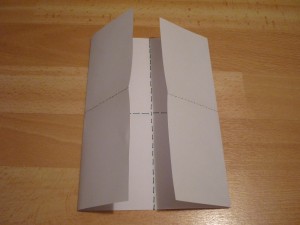
Start by folding the sheet of paper in half lengthways, then unfold and fold in half the short way, so the creases are along the dotted lines as shown above.

Then fold the edges in towards the center crease, and unfold. There will now be eight panels on the sheet, each one a page.

The bottom left panel will be your back cover, the next along your front cover. The layout of pages one through six are outlined above. Create your work on this template, then photocopy, or scan and print copies, and fold each sheet in the exact same way as the template.

To assemble, cut a slit lengthways along the middle, spanning two panels, as shown. You can use a scalpel, or simply fold the paper in half and cut the length of of one panel with scissors.

Fold the sheet lengthways so the bottom panels are in front, and bring the edges in so it takes the shape of a book.

Ta-dah! Now share.


Categories
inspiration sharing

Library in a Box

A couple of weeks ago I wrote a couple of posts about libraries, librarians and what services and characteristics they might provide in the future based on the talks and discussion at Be2camp Brum 2010.

To my mind,  a  library’s primary function is to lend books to people and this service of sharing books in a community is beautifully carried out by this library-in-a-phone-box in Westbury-sub-Mendip, Somerset.

The phone box was bought from BT for £1 in 2009 and then a tea party was held to decide what to do with it. The idea of a mini-library was instantly popular as the nearest public library is four miles away and the mobile library stopped visiting the year before.

There is no full-time librarian and the phone box is open 24 hours a day, seven days a week for members of the village to pop by and drop off books and borrow new ones. There are four wooden shelves of books and the children’s section is a red box on the floor.

I think it’s a great reminder that libraries don’t have to be huge to be valued and makes me wonder what an eBook library might look like and where it might be located. Perhaps a cardboard box in the corner of a café or an old cupboard at the end of the street is all that is needed..

Categories
case study

Case Study – Michelle Kasprzak

Last week, I posted the first case study as part of my research on how Proboscis’ design for eBooks is being used. For me, CCI was a great example of how the eBooks are appropriated and used as part of a cultural organisation’s activities. Although Trail of Imagination and Curiosity was only one example of the kind of projects CCI is engaged in, these kinds of  workshops represented a key aspect of the work that CCI did and it seemed that the eBooks were becoming a key tool in the CCI toolbox for collecting and disseminating information.

The next case I want to present is considerably different in that the eBooks were not designed and used by members of an organisation, but by an independent curator and author: Michelle Kasprzak.

Michelle is currently working out of Amsterdam as the Project Director at McLuhan in Europe 2011. You can read more about her in here personal blog Michelle Kasprzak Art+Life+Technology.

I spoke to her from London via Skype on the 29 July 2010. Two specific examples of how she used the eBooks as part of her work came up in our exchange:

Sample project: Curating.info Conversations


Categories
inspiration making

eBooks for Evaluation and Reflection

Aside from my work at Proboscis I’m currently busy organising the Inspiring Digital Engagement Festival taking place in Sheffield on 15 September 2010. As part of this event we plan to use eBooks to gather feedback from participants about the day and their feelings and experiences of it. So I have been browsing the diffusion library to see how other people have approached using eBooks for this task and have come across a number of examples.


eBooks from Articulating Futures by Niharika Hariharan; eNotebooks from school workshops; StoryCubes at bTween

In the Articulating Futures workshop run by Niharika Hariharan eBooks were designed to take the students through the different workshop activities. The eBooks acted as personal journals and tools for them to bring their ideas together and were used  to reflect over the proceedings of each day. Proboscis have made a number of eNotebooks to use as learning diaries for school workshops such as Experiencing Democracy and Sound Scavenging, as field notebooks to collect ideas in projects such as St Marks and as evaluation tools at conferences such as Enter. At bTween in Manchester 2008 Story Cubes were used to collect people’s answers to questions around new technologies. A similar premise could easily have asked for feedback from participants on the event itself.


A blank probe pack

Finally, a chat with my co-organiser this afternoon reminded me of the eBooks that Orlagh, Niharika and I made for the probe packs we put together as part of Being in Common. These were sent out to twenty people with very different lifestyles and understanding of space living all over the world. The packs were designed to collect participants thoughts, feelings and experiences of common space. Participants returned the packs to Proboscis once they had completed it. You can read more about the probe packs and the *amazing* things people did with them here. It is this kind of reflective eNotebook that I would like to create for the Inspiring Digital Engagement Festival. Of course, you’ll be the first to know how I get on..

Download Articulating Futures eBooks from diffusion.org.uk.
Read about StoryCubes at bTween here.
Find out more about eNotebooks here.

Categories
case study examples

Case Study – Cambridge Curiosity and Imagination

My first encounter as part of this research was with Ruth Sapsed in early July in Cambridge to chat about her work with the eBooks. Ruth is the director of Cambridge Curiosity and Imagination (CCI). She was trained as a psychologist and researcher. According to the CCI website, their approach is to “place the people we work with at the centre, in the role of researchers and experimenters. Artists and creative practitioners work alongside participants as facilitators – allowing them freedom in the form of materials, spaces and time.”

CCI uses the eBook in all sorts of ways with all sorts of people. You can find a number of examples of their designs as part of their Recent Publications on their website. The following is a brief outline of some of the work she is currently doing with the eBook.

Sample project: Trail of Imagination and Curiosity


Categories
examples inspiration sharing

ScrapBooks as Tangible Souvenirs

… And ways to document events and projects

A few days ago we published a ScrapBook made at the Vintage Festival for a project Proboscis is participating in called Graffito – a collaborative iPhone/iPad app that lets people draw on a shared canvas. It was used in the Warehouse tent (which had a 1980s theme) as a collaborative VJ system displayed on a giant LED screen. A number of iPhones were lent out to people to draw with, as well as remote users playing from all over the world (the App is free to download from the AppStore).

For part of the 3 day festival, Jennifer Sheridan (Graffito’s project lead) sat in the control booth capturing snapshots of the screen and printing them off using a Polaroid PoGo printer (a very small portable printer that uses USB & Bluetooth to print ‘zero ink’ pictures from mobiles or digital cameras). She then stuck them into a blank eNoteBook I had designed especially for Graffito. Once back from the festival we disassembled the ‘ScrapBook’, scanned it in and republished it so anyone (whether at the festival, a remote participant or just someone interested) could have a hand made tangible souvenir of the project and the event. The process was very simple (though not helped by Apple’s blocking of Bluetooth connection to the PoGo printer on the iPhone) and points the way to similar uses for lots of other projects. In fact the whole process could easily be copied by anyone with an iPhone : simply download the Graffito app, start drawing and use the ‘snapshot’ feature to capture pictures of your favourite screens. Then download the blank version of the Graffito ScrapBook from diffusion.org.uk, print out and stick in the screen shots to make your own personal Graffito ScrapBook. You don’t need a PoGo printer (though they’re now very cheap to buy, around £20) – you could just print out the pictures on normal paper and glue them in.

As we develop Graffito further, part of our thinking will focus around how to personalise the creation of tangible souvenirs from the project even further. It could be possible, for instance, to request a series of screen shots to be taken from a particular time sequence and made into an eBook or StoryCube. This could be particularly fun for a group of people using it to draw collaboratively and could be combined with maps of where users are located in the world (there’s a short movie demonstrating this on the Graffito website).

I think this ScrapBook is a great example of just how simple it can be to design and make custom eNoteBooks or ScrapBooks for projects and events with bookleteer. Using simple and cheap tools like the PoGo printer, its possible to capture and print images using mobile phones (or cameras via USB) which can be stuck in and notes written around them. Whether its for festivals, art events, schools projects, field research or sports events, its possible to create beautiful and engaging ScrapBooks ‘in the field’ – as they are happening – that can be shared with anyone afterwards.

Get in touch if you’d like us to design a way of creating tangible souvenirs like this for your project or event.

Categories
inspiration making sharing

Tales of Things


Andy demonstrating Tales of Things at Be2Camp Brum 2010; via Meshed Media

Today’s post is another presentation I heard at Be2camp Brum 2010 last week. (It was truly an inspiring and thought-provoking day!) Tales of Things was presented by Andy Hudson-Smith from the Centre for Advanced Spatial Analysis, UCL. Tales of Things explores social memory and asks what happens if we can tag objects in our everyday environment and track these objects – even after we’ve passed them on to someone else.

Entering details of an object into the Tales of Things website allows you to generate a unique QR code for that item which can be printed out and attached to the object. When the QR code is ‘read’ by a camera the web page for that object is triggered. Because Be2Camp Brum was loosely focused around the theme of libraries Andy used tagging books as an example, suggesting that tagged books would be able to use Twitter to keep previous owners up to date with the book’s current location and status.

The Tales of Things website suggests that:

“The project will offer a new way for people to place more value on their own objects in an increasingly disposable economy. As more importance is placed on the objects that are already parts of people’s lives it is hoped that family or friends may find new uses for old objects and encourage people to think twice before throwing something away.”

Promoting the sharing and exchange of objects in this way is obviously interesting in the context of bookleteer and I did actually tag a couple of eBooks with QR codes generated by Tales of Things for Pitch Up & Publish 10: Augmented Reading a few weeks back. Perhaps it’s time for me to go back and revisit that and see where it might lead..

If you want to read more about the project see here, or if you just want to get on and tag your stuff then look here..